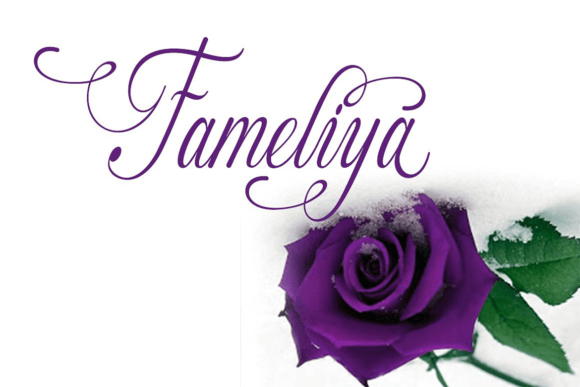
Fameliya: A Script Font for Wedding Elegance and Handmade Business Charm
Fameliya for Wedding Invitations and Elegant Branding
As a designer who frequently works with wedding stationery and boutique packaging, I was immediately drawn to Fameliya. This script handwritten font carries a soft, romantic flair that feels both personal and professionally polished. When I used it for a set of wedding invitations, the result was stunning—delicate flourishes and alternate characters gave the design a custom calligraphy look without the hassle of hand-lettering each name. It’s a perfect fit for brides looking for a timeless aesthetic or for a small business wanting to elevate their event-related offerings.
Fameliya for Candle Labels and Product Packaging Design
One of the first real product mockups I tested Fameliya on was a set of candle labels. The font’s flowing lines and gentle curves added a touch of sophistication that elevated the overall look of the product. I used it for the brand name and a short tagline, and it read beautifully even at a smaller size. As a script font, it’s ideal for short phrases, names, and titles—perfect for product packaging where you want to convey quality and personality without overwhelming the design. Just keep in mind that it’s best for display use rather than long paragraphs or technical details.
Fameliya in Digital Printables and Planner Page Design
If you’re a printable creator, especially in the planner or stationery niche, Fameliya is a fantastic choice. I used it in a set of digital planner pages to label sections like “Wedding Checklist” and “Bride To-Do,” and the results were both elegant and easy to customize. Since the font includes alternate characters and ligatures, I could mix and match to avoid repetition across different page templates. The script style made the digital download feel premium and handcrafted, which is key for attracting customers looking for that personal touch in their planning tools.
Pairing Fameliya with Other Fonts for Balanced Design
One of the most important aspects of using any handwritten font like Fameliya is knowing how to pair it effectively. I found that combining it with a clean sans serif font—like a minimalist Arial or Montserrat—created a beautiful contrast that kept the design from feeling too busy. For example, when designing a boutique gift tag, I used Fameliya for the main name or phrase and a simple sans serif for the smaller details like “To” and “From.” This not only improved readability but also gave the product a more professional finish. It’s especially helpful when working with layered SVG designs or layered Cricut projects where visual hierarchy matters.
Using Fameliya for Stickers, Tags, and Seasonal Craft Designs
I also tested Fameliya on a variety of sticker designs—from seasonal holiday tags to personalized name stickers. The font held up well on both glossy and matte sticker sheets, and the swashes and flourishes added a whimsical charm that’s hard to replicate with standard fonts. For holiday tags, I used it to write names and short messages like “Merry & Bright” and found that it gave the tags a boutique-level finish. However, I did notice that the intricate details can get lost on very small cuts, so I’d recommend using it for stickers that are at least 1.5 inches or larger for best results.
What to Know Before Using Fameliya in Commercial Projects
Before using Fameliya in your shop listings or printables, it’s important to check the licensing terms. Most quality script fonts come with commercial use permissions, but it’s always wise to confirm before selling physical products, digital downloads, or SVG designs. Also, be sure to test the font across different file formats—especially if you’re using it in Canva, Adobe Illustrator, or Silhouette Studio. I found that the font worked seamlessly across platforms, and the multilingual support made it a great option for international sellers or bilingual designs. Lastly, don’t forget to check for ligatures and alternate characters—these can be a game-changer for creating unique, handcrafted-looking pieces without the need for manual editing.